Getting your first freelance client can feel out of reach when you have no reviews and no portfolio. But clients do hire beginners. They hire people who solve one clear problem and make the next step easy.
The fastest way to start is simple:
- Pick one service.
- Build 3-5 samples.
- Set up a basic profile.
- Reach out every weekday.
If you follow this plan for 30 days, you should have real conversations by Week 2 or 3 and a good shot at a paid first project by Day 30.
Three rules. Follow all of them.
- Stick to one service for the full 30 days
- Send outreach every weekday
- Track everything in one spreadsheet
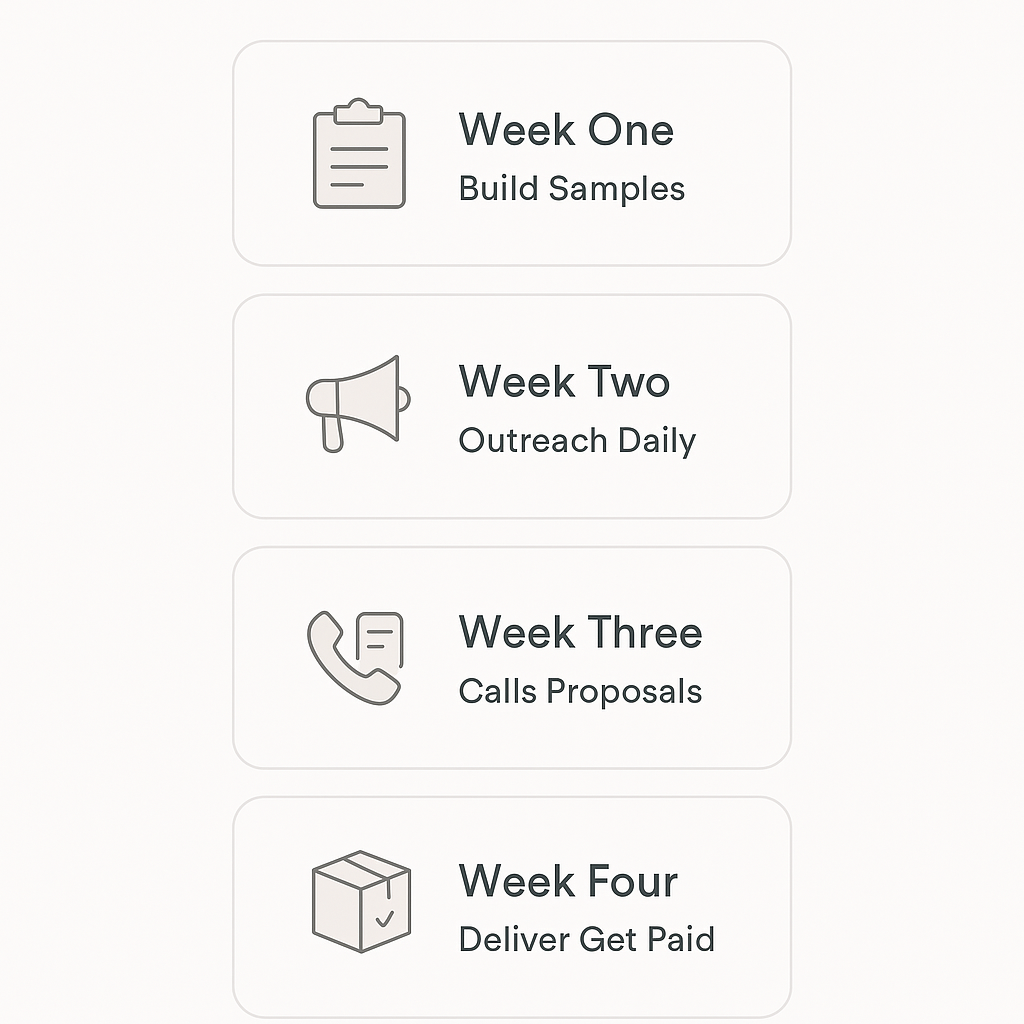
The 30-Day Plan at a Glance
| Days | Main Goal | Daily Time | What “Done” Looks Like |
|---|---|---|---|
| 1-7 | Build offer + portfolio | 60 min | 3-5 samples + basic profile live |
| 8-14 | Start daily outreach | 30-60 min | 20+ messages sent, tracker updated |
| 15-21 | Turn replies into calls + proposals | 60 min | 1-2 calls booked, proposal sent |
| 22-30 | Deliver, get paid, set up next clients | 30-60 min | First payment received, habit locked in |
Week 1 (Days 1-7): Pick What You Sell and Build a “Good Enough” Portfolio
Day 1: Choose One Service You Can Start Selling This Month
Write down skills you have used in jobs, school, volunteering, hobbies, or day-to-day life. Email writing, spreadsheet work, basic design, video cuts, scheduling, research, and customer support all count.
Pick one service and stick with it for 30 days.
Beginner-friendly services with starter rates:
- Content writing / copywriting – $15-$20/hr
- Virtual assistance – $15-$25/hr
- Short-form video editing – $40-$120 per project
- No-code web builds – $50-$180 per site
- SEO / digital marketing help – $60-$150/hr
- Graphic design (Canva/Figma) – $25-$75 per asset
- LinkedIn ghostwriting – $200-$500/month retainer
- AI prompt engineering – $75-$200/hr
Do not claim expert status. Be clear on what you can deliver now.
Day 2: Pick a Niche and One Problem to Solve
Generic offers get ignored. Specific offers get replies.
Use this formula:
I help [type of client] get [result] by [service] in [timeframe].
How to choose a niche:
- Pick a type of client you can find easily
- Pick one problem they likely feel every week
- Pick a result they care about, such as leads, time saved, more content, or better replies
Examples by service:
| Service | Niche | Problem | Simple Offer |
|---|---|---|---|
| Content writing | local service businesses | weak website copy | homepage rewrite |
| Virtual assistance | solo founders | inbox overload | inbox and calendar cleanup |
| Short-form video editing | coaches and creators | no time to post | weekly reel edits |
| Graphic design | small brands | messy visuals | social post design pack |
| AI prompt engineering | teams using AI tools | poor AI outputs | prompt setup and testing |
More niche examples:
- AI prompt engineering: help a support team write better AI prompts for customer replies
- Graphic design: help a bakery create simple promo graphics for weekly offers
- Video editing: help a real estate agent turn phone clips into listing reels
- Copywriting: help a dentist write clearer service pages that bring in calls
A niche does not need to be perfect. It just needs to be clear.
Day 3: Build 3-5 Portfolio Samples
You do not need paid work to create samples. You need proof that you can do the job.
Make 3-5 samples like this:
If you are a content writer
Create:
- 1 blog post
- 1 landing page section
- 1 email newsletter
- 1 social post set
- 1 case-study style sample
Tools: Google Docs, Notion, Grammarly
Example sample ideas:
- A 600-word blog post for a fitness coach
- A homepage rewrite for a plumber
- A 3-email welcome sequence for an online course
If you are a virtual assistant
Create:
- inbox cleanup sample
- calendar planning sample
- SOP or checklist
- meeting notes template
- follow-up message template
Tools: Google Docs, Google Sheets, Notion
Example sample ideas:
- A weekly admin system for a founder
- A client follow-up tracker
- A simple travel booking checklist
If you are a short-form video editor
Create:
- 3 reel or TikTok edits
- 1 before/after edit
- caption style example
- hook text examples
- thumbnail or cover image sample
Tools: CapCut, Canva, Premiere Rush
Example sample ideas:
- A 30-second podcast clip with captions
- A talking-head reel with cuts and zooms
- A product demo edit with text overlays
What each sample should show:
- The type of client
- The problem
- What you made
- Why it helps
Simple case study format:
- Client/type: Local gym
- Problem: Weak social posts
- What I made: 5 promo graphics and 3 caption ideas
- Why it works: Clear offer, simple layout, easy to post
A Google Doc or Notion page is enough.
Day 4: Set Up a Basic Online Presence
Your profile should say what you do, who you help, and how to contact you.
LinkedIn setup steps
Prioritize these sections:
- Photo – clear headshot
- Headline – service + client type
- About – short intro and offer
- Featured – portfolio link
- Experience – use results and service terms
- Services – list your main offer
Headline examples:
- Short-form video editor for coaches and creators
- Virtual assistant for solo founders
- Website copywriter for local businesses
- Canva designer for small brands
- AI prompt support for busy teams
About section formula:
- Who you help
- What problem you solve
- What service you provide
- Link to your portfolio
- Simple call to action
Example:
I help local businesses get clearer website copy and better leads. I write homepage and service page copy that is easy to read and built to convert. You can view samples in my portfolio below. Send me a message if you want help with your site.
Simple portfolio setup
Use one of these:
- Notion
- Google Docs
- Carrd
Notion steps:
- Create a new page
- Add a title and short intro
- Add sections for About, Services, Samples, and Contact
- Paste links to sample work
- Click Share and turn on public access
Google Docs steps:
- Create a new doc
- Add a title
- Add short sections for About, Services, and Samples
- Insert links or screenshots
- Click Share and make it viewable
Carrd steps:
- Sign up
- Pick a simple one-page template
- Add your headline, bio, services, and contact link
- Add sample links or images
- Publish
Keep it clean. One page is enough.
Day 5: Package Your Offer and Set a Starter Price
Do not sell vague help. Sell a clear starter package.
How to price a starter offer:
- List the exact tasks
- Estimate hours for each task
- Multiply by your starter hourly rate
- Add a small buffer for edits and admin
- Add one upgrade option
Simple pricing formula:
(Hours × your rate) + overhead + buffer = price
Example 1: Homepage refresh
- Review current page: 1 hour
- Rewrite headline and intro: 1.5 hours
- Rewrite 3 sections: 2 hours
- Add CTA and polish: 1 hour
- Total: 5.5 hours
- At $25/hr = $137.50
- Add buffer and overhead = $150-$200
Example 2: 4 reels pack
- Plan hooks: 1 hour
- Edit 4 videos: 4 hours
- Add captions and export: 1.5 hours
- Total: 6.5 hours
- At $30/hr = $195
- Add buffer = $200-$275
Example 3: VA starter package
- Inbox cleanup: 2 hours
- Calendar setup: 1 hour
- Follow-up template: 1 hour
- Tracker sheet: 1 hour
- Total: 5 hours
- At $20/hr = $100
- Add buffer = $120-$175
Starter price and upgrades
| Service | Starter Offer | Starter Price | Upgrade Option |
|---|---|---|---|
| Copywriting | Homepage refresh | $150-$300 | Add service page copy |
| VA | Admin cleanup | $120-$250 | Add weekly support |
| Video editing | 4 reels pack | $200-$400 | Add thumbnails and captions |
| Design | 6 social posts | $120-$250 | Add brand kit |
| AI prompt help | Prompt setup | $100-$250 | Add training call |
A starter price should be easy to say yes to. You can raise prices after a few projects.
Day 6: Set Up Your Basics So You Look Professional
This should take under two hours.
- Clean email address
- Invoice template
- Simple contract template
- Google Drive folders
- One notes doc per client
Tools you need:
- Google Drive
- Google Docs
- Google Sheets
- Calendly
- PayPal or Stripe
Day 7: Build a List of 20 Prospects
Make a list of 20 people or businesses that match your niche.
Where to search
Google Maps search terms:
plumber near medentist [city]coaches in [city]marketing agency [city]hair salon [city]real estate agent [city]small business [city]
LinkedIn search terms:
founderownermarketing managercoachconsultantagency ownercontent creator
Who to choose
Look for:
- a clear service business
- an active website or profile
- weak copy, slow replies, or poor content
- a business that looks busy enough to pay
Add each lead to a tracker.
Prospect tracker:
| Name | Website/LinkedIn | Contact | Why They Fit | Personal Note | Date Sent | Follow-Up Date | Status |
|---|---|---|---|---|---|---|---|
Personalization note template:
Saw your [website/post/profile] and noticed [specific detail]. I had one quick idea that could help with [result]. Happy to share it if useful.
Week 2 (Days 8-14): Start Outreach, Simple, Personal, Consistent
Day 8: Write One Cold Email and One Follow-Up
Keep it short. Focus on one problem.
Cold email template:
Hi [Name],
I noticed [specific detail]. It looks like [small problem] may be slowing down [result].
I have a quick idea that could help. Want me to send it over?
, [Your Name]
Follow-up template:
Hi [Name], just checking back in. Happy to send the idea if you still want it.
Day 9: Send Your First 5 Messages
Send 5 emails or DMs to your best-fit leads.
Personalization checklist:
- mention one real detail
- connect it to a likely problem
- ask one simple question
Day 10: Add LinkedIn as a Second Channel
- Send 10 connection requests
- Do not pitch in the request
- Like or comment on 3 posts
- Message after they accept
DM after they accept:
Hey [Name], thanks for connecting. I work with [type of client] on [problem]. I have one quick idea for your [page/profile/content]. Want me to send it?
Day 11: Offer a Mini Audit
Pick 3 prospects and send 3 useful notes.
Mini audit examples:
- Writing: 3 headline fixes
- Video: 3 hook ideas
- VA: 3 workflow fixes
- Design: 3 layout improvements
Keep it short and useful.
Day 12: Keep the Daily Habit Going
- Send 1 message
- Add 5 new prospects
- Update your tracker
Consistency beats overthinking.
Day 13: Follow Up
Most beginners stop too early. Follow up once.
Follow-up template:
Hi [Name], just following up on my last note. No pressure if now is not a fit. If this is still useful, I can send a quick sample.
Day 14: Review What Worked
Check your numbers:
- messages sent
- replies
- calls booked
- best niche
- best subject line
Use what gets replies. Drop what does not.
Week 3 (Days 15-21): Turn Replies Into Calls, Proposals, and Yeses
Day 15: Run a Simple 15-Minute Discovery Call
Ask short questions and listen.
- What are you trying to improve right now?
- What have you already tried?
- What would a win look like in 30 days?
- What is your timeline?
- What budget did you have in mind?
End with:
I’ll send a proposal today.
Day 16: Send a 1-Page Proposal the Same Day
Proposal structure:
- Goal
- Deliverables
- Timeline
- Price and payment terms
- Assumptions
- Next step
3-tier example:
- Basic: one deliverable
- Standard: more support
- Premium: faster turnaround + extras
Day 17: Handle Objections
Short scripts:
- No budget: “I have a smaller starter package. Want the details?”
- Need time: “No problem. Should I check back Thursday or next Monday?”
- No experience: “Fair point. Here are samples that show how I work.”
- Already have someone: “Got it. If you need extra support later, feel free to reach out.”
- Too expensive: “I can narrow it to the core deliverable at a lower price.”
Day 18: Close With a Contract and First Payment
Use a contract for every job.
Contract checklist:
- Names and contact info
- Scope and deliverables
- Timeline
- Payment terms
- Revision limit
- Termination terms
For small jobs, ask for full payment upfront or a 50% deposit.
Day 19: Deliver a Quick Win Early
Send the first part fast if you can.
Update template:
Hey [Name], here’s the latest: [what’s done]. Next I’m working on [next step].
Ask one focused question:
Does this match the tone you wanted?
Day 20: Ask for a Testimonial and a Referral
Ask right after delivery.
Really glad this helped. Would you be open to writing 2-3 sentences about your experience?
Then:
Do you know one other person who might need this too?
Ask to use the work in your portfolio.
Day 21: Add the Project to Your Portfolio
Add:
- the client type
- the problem
- what you delivered
- turnaround time
- a quote if you have permission
Use real outcomes only.
Week 4 (Days 22-30): Deliver, Get Paid, and Build Repeatable Flow
Day 22: Prevent Scope Creep
Confirm the scope in writing.
Reply template:
Happy to add that. It is outside the original scope, so I would quote it as an add-on. Want me to send a price?
Day 23: Build a Simple Weekly Routine
- 30 minutes outreach
- focused delivery time
- Friday admin block
Weekly schedule:
- Mon: outreach + delivery
- Tue: delivery + client updates
- Wed: outreach + delivery
- Thu: delivery + proposals
- Fri: follow-ups + invoices + tracker update
Day 24: Create a Retainer Offer
Turn one-off work into monthly support.
Examples:
- 4 reels per week
- 2 blog posts per week
- 10 VA hours per month
Day 25: Invoice Cleanly and Get Paid on Time
Send the invoice the same day you hit a milestone.
Invoice checklist:
- Date
- Client name
- Invoice number
- Services
- Total amount
- Due date
- Payment link
Day 26: Track Money and Prep for Taxes
Keep business and personal spending separate. Track income and expenses weekly.
Simple bookkeeping sheet:
| Type | Columns |
|---|---|
| Income | Date, Client, Project, Invoice #, Amount, Method, Status, Notes |
| Expenses | Date, Category, Vendor/Description, Amount, Method, Receipt Link, Deductible (Y/N) |
Set aside part of each payment for taxes.
Day 27: Keep Outreach Going
Minimum rule:
- 1 cold message per weekday
- 5 new prospects per week
- follow up every Friday
Do not stop outreach after your first client.
Day 28: Raise Your Close Rate
Small changes can help:
- make the offer more specific
- add a stronger sample
- use a clearer call to action
CTA examples:
- Worth a 10-minute call this week?
- Want me to send a quick sample?
- Should I put together a short proposal?
Day 29: Plan Your Next 30 Days
If one niche gets replies, stay there.
Improve one thing:
- portfolio
- outreach
- offer clarity
Raise rates after you have real results.
Day 30: Final Checklist
- Portfolio has 3-5 solid pieces
- Offer fits in one sentence
- Tracker is up to date
- Outreach habit is active
- At least one paid project is done or in progress
- Testimonial requested
- Next 20 prospects ready
Copy/Paste Templates
Cold Email , Local Business
Hi [Name], I noticed your [website/Google listing] is missing [specific thing]. I think that may be costing you [leads/calls/time]. I put together a quick fix and can send it over if useful. Open to a 10-minute call this week?
Cold Email , Creator or Solo Founder
Hey [Name], I like what you are building with [project/channel]. I noticed your [content/page] could work better with a few small changes. I have 3 ideas, want me to send them?
Follow-Up , Low Pressure
Just following up on my last note. No worries if now is not the right time.
LinkedIn DM After Connecting
Hey [Name], thanks for connecting. I help [type of client] with [problem]. I have one quick idea for your [specific thing]. Want me to send it?
Proposal Skeleton
Goal: [What they told you]
Deliverables: [Exact list]
Timeline: [Start to finish]
Price: [Amount]
Revisions: Up to 2 rounds
What I need from you: [Assets, access, approvals]
Next step: Sign + pay deposit
Contract Checklist
- Party names and contact info
- Scope of work
- Timeline
- Payment terms
- Revision limit
- Termination clause
Invoice Email
Hi [Name], attached is invoice #[number] for [project]. Total: $[amount], due by [date]. You can pay via [PayPal/Stripe link]. Let me know if you have any questions.
Common Beginner Mistakes
| Mistake | Solution |
|---|---|
| Offering too much | Pick one service for 30 days |
| Waiting to feel ready | Start outreach now |
| Hiding prices | Give a clear starting price |
| Skipping follow-ups | Follow up at least once |
| Trying to build a perfect portfolio | Ship 3-5 good samples first |
FAQ
Can I make $1,000 a month freelance writing?
Yes. You do not need many clients. At $15-$20/hr, that can be 50-65 hours a month. With project pricing, 4-7 small projects can get you there.
How to start freelancing as a beginner?
Pick one service. Build 3-5 samples. Set up a basic LinkedIn or portfolio page. Then send outreach every weekday.
What is the #1 skill for freelancing?
Communication. Clear updates, fast replies, and reliable delivery matter a lot.
Can I get paid to type?
Yes. Data entry, transcription, and virtual assistance all pay for typing-heavy work.
Can freelancing work if I only have 1 hour a day?
Yes. Split it between outreach and portfolio or delivery.
Do I need Upwork, or can I start with cold email and LinkedIn?
You can start with cold email and LinkedIn. They often work faster for beginners.
What if I have zero samples?
Make spec samples. School work, practice work, and mock projects all count.
How many people do I need to contact to get one client?
Often 20-100 messages, depending on your niche and message quality.
What if nobody replies after 2 weeks?
Check your niche, your message, and your follow-up. Then send more volume.
How do I price my first job without undercharging?
Estimate the hours, multiply by a starter rate, then add a buffer. Use a project price, not vague hourly work, when you can.